Just snap a receipt.
AI journals it for you.

AI instantly reads receipts and invoices, auto-classifying account categories and tax codes.
Multi-language support for businesses anywhere in the world.

CAFE ABC
- - - - - - - - -
Latte480
Cake550
Water250
- - - - - - - - -
TOTAL1,280
2026/04/10 14:32
AI Analysis
Easy Expense Entry
Receipt receipt_cafe_abc.jpg
VendorCAFE ABC
Date2026-04-10
Total1,280
CurrencyJPY
ItemQtyUnit PriceAmountCategoryTax
Latte1480480Meeting ExpenseTaxable
Cake1550550Meeting ExpenseTaxable
Water1250250SuppliesTaxable
✓ Confirm & Add to Ledger
90%
Reduction in data entry time
~5sec
Analysis time per document
🌐
Multi-language receipt support
FREE
Start now with the free plan

Sound familiar?

Manual entry takes forever

Typing in receipts one by one — the pile grows and becomes a real burden at month-end.

🗒

Complex journal entries

Splitting expenses into the right accounts — purchases, outsourcing, materials — is tedious.

👥

Hard to share across the team

Collecting receipts from the field and handing them to accounting — risk of loss included.

🌐

Can't read foreign receipts

Receipts in other languages with different formats slow down your processing.

Person frustrated with receipt processing

Done in just 3 steps

1
Snap or Upload

Snap or Upload

Take a photo on your phone, or drag & drop from your PC. Multiple files at once — no problem.

2
AI auto-analyzes

AI auto-analyzes

Vendor, amount, line items, account category, tax code — all read and classified by AI instantly.

3
Review & Confirm

Review & Confirm

Check the results, one click to post to the ledger. CSV export is just as quick.

Use cases

Snap receipts on the go

Snap receipts on the go

Photograph receipts the moment you get them. Back at the office, the accountant auto-journals with AI. No more piling up receipts.

Team collaboration across locations

Team collaboration across locations

Organize by project per office or department. Field staff upload, HQ handles journaling. Smooth teamwork even when apart.

Complex journals handled by AI

Complex journals? Leave it to AI

Industry-specific entries like purchases, materials, and outsourcing — AI handles them. Custom prompts and account masters adapt to your business rules.

Business trips abroad

Business trips abroad

AI auto-recognizes receipts in any language. Expense reports after international trips become effortless. Works worldwide.

AI transforms expense processing

Advanced AI recognition digitizes any receipt or invoice in seconds

AI auto-reading

AI auto-reading

State-of-the-art AI extracts text, amounts, and line items from images and PDFs with high accuracy. Zero manual entry.

Multi-language support

Multi-language support

Recognizes receipts in Japanese, English, and many more languages. International trips? No worries.

Any format

Any format

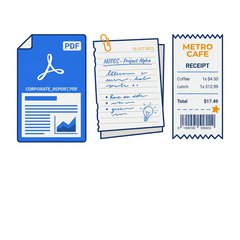
Handwritten receipts, convenience store receipts, hotel invoices, PDF bills — any format works.

Auto line-item extraction

Auto line-item extraction

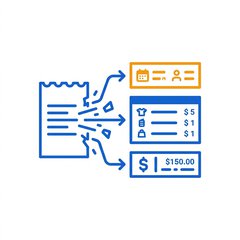
Automatically splits multiple items from a single receipt. Manage account category and tax code per item.

Drag & Drop

Drag & Drop

Drag & drop multiple files at once. Batch upload for maximum efficiency.

Powerful search & filters

Powerful search & filters

Date range, type, account category, currency, keyword — drill down your confirmed data any way you like.

Fully customizable for your business

💬

Custom AI instructions

Tell the AI your rules in plain language: "Classify transit IC top-ups as Transportation." Your rules, your AI.

📚

Account category master

Edit account categories to fit your industry. Common categories are pre-loaded; add, change, or remove as needed.

💰

Tax classification master

Set up tax codes for your region — consumption tax, GST, VAT, and more. Ready for global use.

📊

CSV export

Two CSV formats: by document or by line item. Seamlessly integrate with your accounting software.

Built for teams, built for delegation

Project sharing and role-based permissions keep team expense processing smooth

📷
Uploader

Snap receipts
Upload files

📈
Accountant

AI journaling
Confirm data
CSV export

💼
Admin

Change settings
Manage masters
Confirm entries

🙋
Owner

Create projects
Invite members
Full access

Before vs After

Before
Type in each receipt by hand
Translate foreign receipts manually
Decide the account category every time
Collect receipts and hand-deliver to accounting
Overtime at month-end processing piled-up receipts
After
Just snap — AI enters it for you
Any language receipt recognized as-is
AI auto-assigns category and tax code
Upload on the spot, shared instantly
Real-time processing, zero month-end burden

Even more features

📄 PDF invoice reading
📱 Fully mobile-responsive
🔒 Sign in with Google
👁 Document / line-item dual views
📊 Real-time AI usage monitoring
🌐 Japanese / English UI switching

Pricing

Start with the free plan — no credit card required

FREE

Free Plan

Free
Trial period — extra quota!
  • AI auto-reading
  • Multi-language support
  • Custom account categories & tax codes
  • Project sharing & team features
  • CSV export
  • Monthly analysis limit applies

FAQ

What file formats are supported?
We support image files (JPEG, PNG, etc.) and PDFs. Upload photos taken on your phone or scanned PDF invoices directly.
What languages can it read?
Using the latest AI technology, we recognize receipts and invoices in Japanese, English, and many other languages. Process international receipts with ease.
Can I use my own account categories?
Yes. You can freely edit the account category and tax classification masters to match your accounting system. AI classification follows your customized categories.
Can teams use it?
Yes. With project sharing, you can assign four roles — Owner, Admin, Accountant, and Uploader — for smooth team-based workflows. Field staff upload receipts, accounting confirms the entries.
Is my data secure?
Uploaded files are stored securely in encrypted cloud storage, and all communication and authentication are properly protected.
Are there limits on the free plan?
The free plan has a monthly AI analysis limit, but all features are available. Start with the free plan and upgrade when you need more.
Can it integrate with accounting software?
We offer two CSV export formats — by document and by line item. Import the CSV into your accounting software for seamless data transfer.

Contact Us

Have questions or feedback? We'd love to hear from you

Make expense entry effortless.

Just snap a receipt, and AI handles the rest.
Try it free — no credit card required.

Get Started Free